
Overview
The SeggWat n8n node allows you to automate feedback workflows in n8n, the popular workflow automation platform. With this integration, you can:- Auto-triage feedback: Route bug reports to developers, feature requests to product managers
- Alerting: Get notified when page ratings drop below a threshold
- Reporting: Generate weekly feedback summaries and send them via email or Slack
- Data sync: Push feedback to other tools like Linear, Jira, or Notion
- Bulk operations: Update feedback statuses in batch based on conditions
Prerequisites
Before you start, ensure you have:- An n8n instance (self-hosted or n8n Cloud)
- A SeggWat account with at least one project
- An Organization Access Token (API key) - see Authentication
Installation
Install the Community Node
In your n8n instance, go to Settings → Community Nodes and search for
n8n-nodes-seggwat. Click Install.Alternatively, for self-hosted n8n, install via npm:Create API Credentials
- Log in to your SeggWat Dashboard
- Go to Settings → API Tokens
- Click Create New Token and label it “n8n Integration”
- Copy the token immediately (it won’t be shown again)
Available Operations
The SeggWat node provides two resources: Feedback and Rating, each with multiple operations.Feedback Operations
| Operation | Description |
|---|---|
| Submit | Create new feedback programmatically |
| List | Retrieve feedback with filtering, sorting, and pagination |
| Get | Fetch a single feedback item by ID |
| Update | Modify feedback message, type, or status |
| Delete | Remove a feedback item |
Rating Operations
| Operation | Description |
|---|---|
| Submit | Create a new rating (helpful/not helpful) |
| List | Retrieve ratings with optional filters |
| Get | Fetch a single rating by ID |
| Get Statistics | Retrieve aggregated rating metrics |
| Delete | Remove a rating |
Common Use Cases
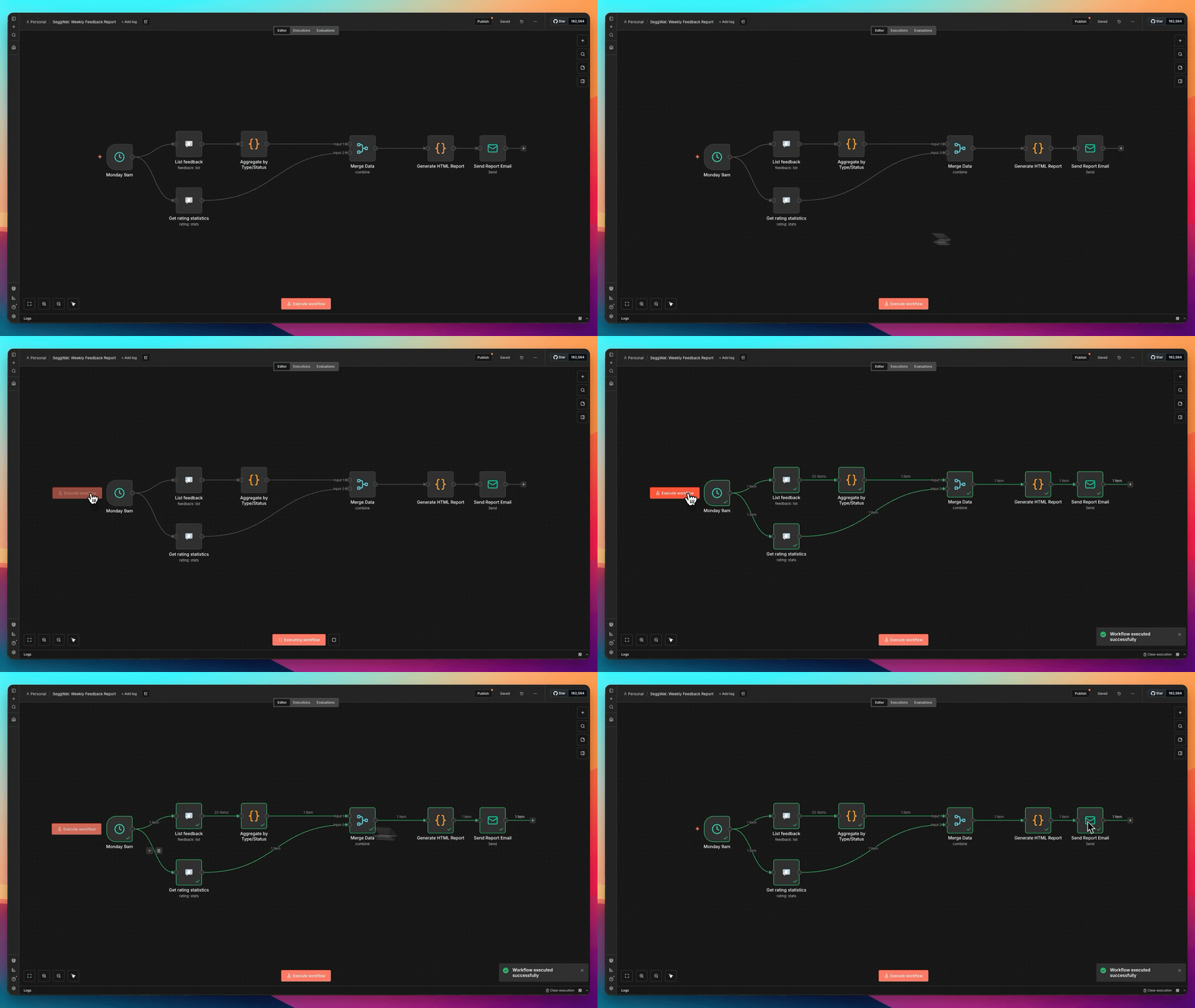
Weekly Feedback Summary
Send a weekly digest of feedback activity.Fetch Feedback
Add a SeggWat node with:
- Resource: Feedback
- Operation: List
- Return All: true
- Sort by: created_at (descending)
Low Rating Alert
Get notified when a page’s rating drops below a threshold.Get Rating Stats
Add a SeggWat node:
- Resource: Rating
- Operation: Get Statistics
- Project ID: your project
- Path filter:
/docs/getting-started(optional, for specific pages)
Node Configuration Reference
Feedback List Options
| Parameter | Description |
|---|---|
| Project | Select from your available projects |
| Status Filter | New, Active, Assigned, Hold, Closed, Resolved |
| Type Filter | Bug, Feature, Praise, Question, Improvement, Other |
| Search | Full-text search in feedback messages |
| Sort By | created_at or updated_at |
| Sort Order | Ascending or descending |
| Limit | Max items per page (1-100) |
| Return All | Fetch all pages automatically |
| Simplify | Return only essential fields |
Feedback Submit Options
| Parameter | Description | Required |
|---|---|---|
| Project | Target project | Yes |
| Message | Feedback content | Yes |
| Path | Page URL where feedback originated | No |
| Version | App version string | No |
| Source | Widget, Manual, or custom | No |
| Submitted By | User identifier | No |
Rating Statistics Options
| Parameter | Description |
|---|---|
| Project | Target project |
| Path | Filter stats for a specific page path |
total- Total number of ratingshelpful_count- Number of helpful (thumbs up) ratingsnot_helpful_count- Number of not helpful (thumbs down) ratingshelpful_percentage- Percentage of helpful ratings
Filtering and Pagination
Filter Feedback by Multiple Criteria
Combine filters to narrow down results:Paginate Large Datasets
For projects with many feedback items:- Set Return All to
trueto automatically fetch all pages - Or set a Limit (max 100) and handle pagination manually with the Page parameter
Simplified Output
Enable Simplify Output to receive only essential fields: Full output:Error Handling
The node provides clear error messages for common issues:| Error | Cause | Solution |
|---|---|---|
| Connection refused | n8n can’t reach SeggWat API | Check network/firewall settings |
| Host not found | Invalid API URL | Verify the API URL in credentials |
| 401 Unauthorized | Invalid or expired API key | Generate a new API key |
| 403 Forbidden | API key lacks permission | Check organization membership |
| 404 Not Found | Invalid project or item ID | Verify the ID exists |
Best Practices
Use Return All sparingly
Use Return All sparingly
Fetching all items can be slow for large datasets. Use filters and pagination when possible, and only enable Return All when you genuinely need every item.
Add error handling
Add error handling
Always include error handling in production workflows. Use n8n’s Error Trigger to catch failures and send alerts.
Use meaningful source values
Use meaningful source values
When submitting feedback programmatically, set a descriptive Source value (e.g., “n8n-triage”, “slack-bot”) to track where feedback originates.
Rate limit awareness
Rate limit awareness
SeggWat enforces rate limits (20 requests/minute for feedback endpoints). For bulk operations, add delays between requests using n8n’s Wait node.
Test with a staging project
Test with a staging project
Create a separate project for testing workflows before connecting to your production project.
Troubleshooting
Credential Test Fails
- Verify your API key is correct (starts with
oat_) - Check if the API key has been revoked in the dashboard
- Ensure the API URL doesn’t have a trailing slash
No Projects in Dropdown
- Confirm your API key belongs to an organization with projects
- Check that your user has access to the projects
Empty Results
- Verify the project has feedback/ratings
- Check if filters are too restrictive
- Try removing filters to confirm data exists